Free 7-day trial — No credit card required
WhatsApp API Bangladesh is becoming an important business communication solution for companies that want to manage customer support, sales, order updates, marketing conversations and automation through WhatsApp at scale.
Instead of relying only on the standard WhatsApp Business App, businesses can use Meta’s official WhatsApp Business Platform to connect WhatsApp with customer-support software, CRM systems, chatbots, automation tools and multi-agent inboxes.
This guide explains how businesses can get WhatsApp Business API in Bangladesh, what the setup requires, how pricing works, what a no-code chatbot can do, and how Bangladesh-focused businesses can build workflows involving bKash, Nagad and Upay.
WhatsApp API Bangladesh: Key Takeaways
- WhatsApp API Bangladesh allows businesses to connect WhatsApp with software, CRM, automation and customer-support systems.
- The official business messaging solution is Meta’s WhatsApp Business Platform.
- Companies can use WhatsApp for customer support, sales, order notifications, lead management, chatbot automation and eligible business messaging.
- A no-code WhatsApp chatbot can automate common customer conversations without building every workflow manually.
- Bangladesh-focused workflows can include bKash, Nagad and Upay, subject to merchant, payment-provider and technical availability.
- WhatsFly follows a 0% markup model on applicable Meta messaging charges.
What is WhatsApp API in Bangladesh?
The WhatsApp Business Platform is designed for businesses that need more advanced communication capabilities than basic one-to-one messaging from a mobile phone.
Businesses can use WhatsApp API for workflows such as:
- Customer support
- Sales conversations
- Lead qualification
- Order confirmation
- Delivery updates
- Appointment reminders
- Customer authentication
- Eligible marketing communication
- CRM integration
- WhatsApp chatbot automation
- Multi-agent support
- Business-system integration
For official information about the platform, visit Meta’s WhatsApp Business Platform.
WhatsApp Business App vs WhatsApp Business API
| Feature | WhatsApp Business App | WhatsApp Business API |
|---|---|---|
| Basic business messaging | Yes | Yes |
| Multiple-agent workflows | Limited | Yes, through suitable software |
| Advanced automation | Limited | Yes |
| CRM integration | Limited | Yes |
| API integration | No | Yes |
| No-code chatbot through a platform | Limited | Yes |
| Business-system integration | Limited | Yes |
| Scalable customer support | Limited | Yes |
Who Should Use WhatsApp API in Bangladesh?
The WhatsApp Business API in Bangladesh is especially useful for businesses that receive many customer conversations or need several employees to manage WhatsApp communication.
| Industry | Typical WhatsApp API Use |
|---|---|
| E-commerce | Order confirmation, customer support, COD workflows, delivery updates and eligible campaigns |
| Restaurants | Reservations, order inquiries, customer support and promotions |
| Retail | Product inquiries, customer service and promotional communication |
| Education | Admission inquiries, class notifications, reminders and support |
| Travel | Booking confirmations, itinerary communication and lead management |
| Real Estate | Lead qualification, property inquiries and agent handover |
| Healthcare | Appointments, reminders and customer communication |
| Service Businesses | Lead management, quotations, follow-up and customer support |
WhatsApp API Requirements in Bangladesh
Prepare these before starting
- Correct legal or business name
- Business address
- Business website or legitimate online presence
- Business email address
- Meta Business Portfolio
- A phone number for WhatsApp
- Appropriate business category
- Business documents if verification is requested
Your business information should be accurate and reasonably consistent across your website, Meta business environment and any documentation submitted during verification.
How to Get WhatsApp API in Bangladesh — Step by Step
Collect the correct information for the company that will use the WhatsApp Business Platform. Consistent business information can reduce unnecessary issues during onboarding and verification.
Your WhatsApp business assets are managed within Meta’s business ecosystem. If your company already uses Meta business tools, you may already have a Business Portfolio.
Make sure the appropriate business owner or authorized administrator maintains access.
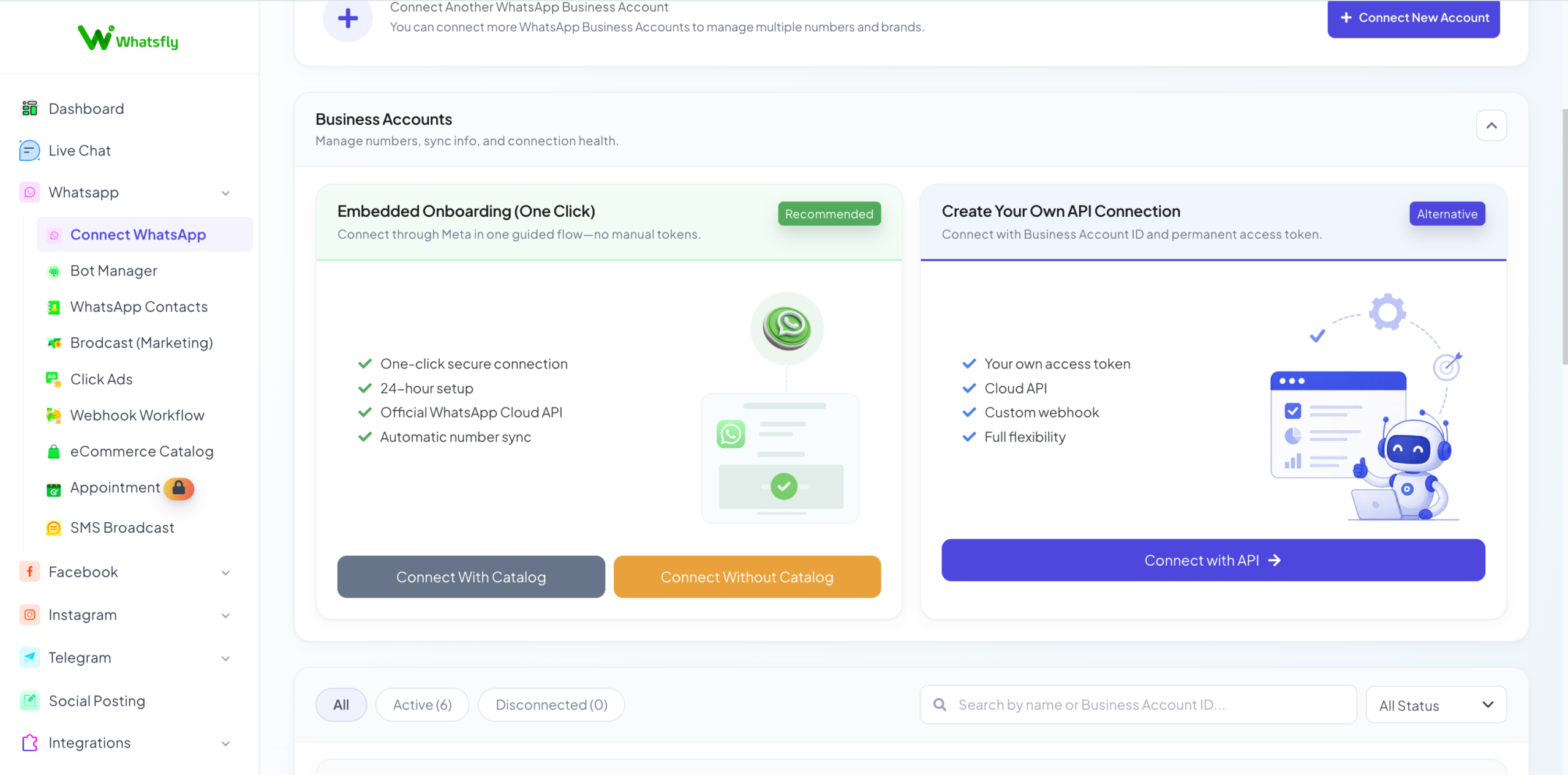
You can either build directly with Meta’s Cloud API or use a WhatsApp API platform that provides a ready-made inbox, automation tools and onboarding experience.
Choose the business number your customers will use to communicate with your company and connect it through the applicable onboarding process.
Add accurate information such as your business display name, description, category, website and other available business details.
Meta may request business verification depending on your account, business setup or features being used.
Create appropriately categorized templates for eligible business-initiated messages such as order updates, reminders, authentication or marketing communication.
Build a clear consent process so customers understand what type of WhatsApp communication they are agreeing to receive.
Connect your WhatsApp Business Account with the software your team will use for customer conversations, automation and agent management.
Depending on your requirements, integrate WhatsApp with your CRM, website, e-commerce store, payment workflow or other business systems.
WhatsApp Cloud API vs WhatsApp API Platform
Option 1: Direct WhatsApp Cloud API
Businesses with an internal development team can build directly using Meta’s Cloud API.
Developers may need to manage:
- API requests
- Webhooks
- Access and authentication
- Message processing
- Database logic
- CRM integration
- Chatbot logic
- Agent interface
- Monitoring and maintenance
Developers can review the official WhatsApp developer documentation for current technical setup information.
Option 2: Use a WhatsApp API Platform
A business that does not want to build the complete software layer can use a WhatsApp API platform.
A platform such as WhatsFly can provide:
- Shared team inbox
- No-code chatbot
- Broadcast management
- Automation
- Agent management
- Customer management
- Business integrations
- Bangladesh-focused payment workflows
You can also read our WhatsApp API Provider Bangladesh guide for more information about selecting a platform.
How to Connect Your WhatsApp Business Number
Choose a number customers can associate with your actual business. The number is then connected through the applicable WhatsApp Business Platform onboarding process.
Set Up Your WhatsApp Business Profile
After the number is connected, complete the available business-profile information.
- Business display name
- Business category
- Business description
- Website
- Business address
Consistent branding makes it easier for customers to recognize the company they are communicating with.
Meta Business Verification for WhatsApp API
Do not modify documents or submit misleading information merely to complete verification.
WhatsApp Message Templates for Businesses
Message templates are used for eligible business-initiated communication.
Order Update Example
Appointment Reminder Example
Marketing Example
Templates should be appropriately categorized and used in accordance with applicable WhatsApp Business Messaging requirements.
Customer Opt-In for WhatsApp Marketing
WhatsApp opt-ins can potentially be collected through:
- Website forms
- Checkout pages
- Click-to-WhatsApp ads
- QR codes
- Facebook and Instagram campaigns
- Physical stores
- Registration forms
- Customer-service interactions where appropriate
WhatsApp Chatbot Bangladesh: No-Code Automation
Example WhatsApp Chatbot Flow
Customer: Hi
Chatbot:
Welcome to ABC Store. How can we help you?
1. View Products
2. Check Order Status
3. Payment Information
4. Talk to Support
The chatbot can continue the relevant workflow or transfer the conversation to a human support agent.
Customer Support
Answer repetitive questions before escalating more complex conversations.
Lead Qualification
Ask customers relevant questions and send qualified leads to the appropriate sales team.
Order Information
Provide structured information about orders, delivery and customer-service processes.
Appointment Flow
Guide customers through appointment, booking or reservation inquiries.
Product Inquiry
Help customers navigate products, services and frequently asked questions.
Human Handover
Transfer conversations from automation to an available human agent.
WhatsFly provides a no-code chatbot builder for businesses that want to create automated customer journeys without developing the complete chatbot infrastructure themselves.
WhatsApp API with bKash, Nagad & Upay
Bangladesh-Focused Payment Workflows
Businesses can build WhatsApp customer journeys involving popular Bangladesh payment options such as:
- bKash
- Nagad
- Upay
WhatsApp itself is not a payment gateway. The business needs the appropriate merchant or payment setup and technical integration for the payment method it wants to use.
This localization can make WhatsApp automation more practical for businesses primarily serving customers inside Bangladesh.
WhatsApp API Pricing in Bangladesh
| Cost Component | What It Means |
|---|---|
| Meta Messaging Charges | Applicable WhatsApp messaging charges based on Meta’s current pricing structure and message category. |
| Platform Subscription | The software fee for tools such as inbox, chatbot, automation, campaign management and team access. |
| Provider Markup | An additional percentage or fee that a provider may add on top of Meta’s messaging charge. |
| Custom Integration | Additional development for CRM, ERP, e-commerce, payment or other systems where required. |
| Taxes or Other Charges | Applicable taxes or payment-processing charges depending on the service and billing structure. |
Meta pricing can change over time. For the latest official rates, check the WhatsApp Business Platform Pricing page.
What Does 0% Markup on Meta Messaging Fees Mean?
In simple terms:
Applicable Meta messaging charge = X
WhatsFly percentage markup on that Meta charge = 0%
A separate software subscription, tax, optional integration or other applicable service charge may still apply.
How to Choose a WhatsApp API Provider in Bangladesh
When comparing a WhatsApp API provider in Bangladesh, do not evaluate the provider based only on the lowest monthly subscription price.
Consider:
- Official WhatsApp Business Platform onboarding
- Pricing transparency
- Markup on Meta messaging charges
- Bangladesh billing or payment convenience
- No-code chatbot availability
- Shared team inbox
- Number of agents included
- Broadcast and automation tools
- CRM integrations
- Local support
- Payment workflow options
- Account and data ownership
For a dedicated comparison, see our WhatsApp API Provider in Bangladesh guide.
Why Use WhatsFly for WhatsApp API in Bangladesh?
| WhatsFly Feature | Business Benefit |
|---|---|
| WhatsApp API onboarding | Simplifies connecting businesses to the WhatsApp Business Platform. |
| No-code chatbot | Create customer automation without programming the entire workflow. |
| Shared team inbox | Allow authorized team members to manage customer conversations from one platform. |
| Automation | Reduce repetitive work and route customers through structured flows. |
| Broadcast management | Manage eligible WhatsApp business campaigns from a centralized system. |
| Customer management | Keep customer conversations and relevant customer information organized. |
| bKash workflows | Support Bangladesh-focused payment journeys where the required merchant integration is available. |
| Nagad workflows | Create local payment flows for supported merchant configurations. |
| Upay workflows | Support additional Bangladesh payment journeys where available. |
| Markup on applicable Meta messaging charges | 0% |
WhatsApp API Use Cases in Bangladesh
E-commerce Orders
Order confirmation, support, delivery updates and customer follow-up.
Restaurant Communication
Reservation inquiries, order support, promotions and customer service.
Education
Admissions, reminders, announcements and student communication.
Real Estate
Lead qualification, property inquiries and agent routing.
Travel & Hospitality
Booking communication, itinerary updates and customer support.
Service Businesses
Lead management, appointment workflows and after-sales support.
Complete WhatsApp API Bangladesh Setup Process
| Step | Action |
|---|---|
| 1 | Prepare accurate business information |
| 2 | Create or access your Meta Business Portfolio |
| 3 | Choose direct Cloud API or a WhatsApp API platform |
| 4 | Connect your WhatsApp business phone number |
| 5 | Configure your business profile |
| 6 | Complete verification when required |
| 7 | Create appropriate message templates |
| 8 | Establish appropriate customer opt-in |
| 9 | Configure chatbot, inbox and automation |
| 10 | Connect CRM, payments and other business systems |
Common WhatsApp API Mistakes to Avoid
- Using unofficial automation tools. Use official WhatsApp Business Platform infrastructure instead of tools designed to bypass WhatsApp policies.
- Sending unsolicited promotional messages. Build an appropriate customer opt-in process.
- Using inconsistent company information. Keep important business information accurate across your website, Meta business environment and documents.
- Comparing only subscription price. Compare Meta messaging costs, platform fees, markup and optional integration charges separately.
- Assuming API access includes a full CRM. API access and business-management software are different layers.
- Not planning agent handover. Automation should have a clear process for transferring customers to human support when required.
- Ignoring account ownership. Businesses should maintain appropriate control over their Meta business assets and WhatsApp number.
WhatsApp API Bangladesh — Frequently Asked Questions
Can I get WhatsApp API in Bangladesh?
Yes. Eligible businesses in Bangladesh can use the official WhatsApp Business Platform subject to Meta’s applicable requirements, policies and account eligibility.
How do I get WhatsApp API in Bangladesh?
Prepare your business information, set up your Meta Business Portfolio, choose your API setup method, connect a phone number, configure your business profile, complete applicable verification and connect your preferred inbox, chatbot, CRM or automation platform.
What is WhatsApp Business API Bangladesh?
WhatsApp Business API Bangladesh refers to Bangladeshi businesses using Meta’s WhatsApp Business Platform to integrate WhatsApp with business software, automation, CRM, chatbots and customer-support systems.
Do I need coding skills to use WhatsApp API?
Not necessarily. Direct Cloud API development requires technical skills, but no-code platforms can provide an inbox, chatbot, automation and business-management interface without requiring a company to build everything from scratch.
Can I create a WhatsApp chatbot without coding?
Yes. A no-code WhatsApp chatbot platform can allow businesses to create automated conversation workflows using a visual interface.
Does WhatsApp API support bKash?
WhatsApp is not itself a payment gateway, but WhatsApp customer workflows can be integrated with supported bKash merchant or payment systems when the required account and technical integration are available.
Can I use Nagad with WhatsApp API?
A WhatsApp business workflow can be connected with supported Nagad payment processes where the required merchant account and technical integration are available.
Can WhatsApp API work with Upay?
WhatsApp workflows can be connected with supported Upay payment processes where the necessary merchant and technical integration are available.
Does WhatsFly charge markup on Meta messaging fees?
WhatsFly follows a 0% markup model on applicable Meta messaging charges. Separate software subscription fees, taxes, optional integrations or other applicable services may still apply.
How much does WhatsApp API cost in Bangladesh?
Total cost can depend on Meta’s applicable messaging charges, the selected software platform, subscription plan, provider markup and any optional integration or service fees.
Can multiple agents use one WhatsApp API account?
A suitable shared-inbox platform can allow multiple authorized agents to manage WhatsApp customer conversations from a centralized system.
Can I send WhatsApp bulk messages in Bangladesh?
The WhatsApp Business Platform supports eligible business-initiated messaging using appropriate templates and subject to Meta’s policies, customer-consent requirements, account quality and applicable messaging limits.
Is WhatsApp API good for e-commerce businesses in Bangladesh?
Yes. E-commerce businesses can use WhatsApp API for customer support, order communication, chatbot automation, lead management, eligible marketing workflows and integration with other business systems.
Can I use my existing WhatsApp number for WhatsApp API?
An existing number may be usable depending on its current WhatsApp configuration and Meta’s applicable migration or coexistence options. Review the current onboarding requirements before changing an active business number.
Do I need Meta Business Verification?
Verification requirements can vary depending on the business, account configuration and features being used. Meta may request business verification as part of the relevant setup or review process.
What is the best WhatsApp API provider in Bangladesh?
The best WhatsApp API provider depends on your business requirements. Compare onboarding support, pricing transparency, provider markup, no-code chatbot tools, multi-agent inbox capabilities, integrations, local support and Bangladesh-specific workflows.
Get Started with WhatsApp API in Bangladesh
WhatsApp API Bangladesh gives businesses a way to move beyond basic mobile messaging and connect WhatsApp with customer-support software, automation, CRM systems, chatbots and multi-agent workflows.
For most businesses, the setup starts with preparing accurate company information, using a Meta Business Portfolio, connecting a business phone number and choosing the right WhatsApp API software.
Bangladesh-focused businesses can also benefit from localized workflows involving bKash, Nagad and Upay.
WhatsFly combines WhatsApp Business Platform onboarding with a no-code chatbot, shared inbox, automation, local payment workflows and 0% markup on applicable Meta messaging charges.